Insights Connector for Power BI
The Insights Connector for Power BI gives you access to your Business Central data, allowing you to use any of our Power Bl report suites.


The Foundation Behind Every Business Central Insights App
The Insights Connector for Power BI provides secure access to your Microsoft Dynamics 365 Business Central data, enabling all Business Central Insights Power BI apps and reports.
Rather than deploying multiple connectors for different reports, the Insights Connector provides a single connection point for your Business Central data, making implementation faster, simpler and easier to maintain.
Built specifically for Microsoft Dynamics 365 Business Central, the Connector app allows businesses to unlock powerful reporting and analytics across finance, sales, inventory, purchasing, manufacturing, projects, service, CRM and warehouse operations.
Simplify Reporting and Analytics
Many organisations still rely on spreadsheets, manual exports and custom-built reports to access critical business information.
The Insights Connector eliminates these challenges by providing a single source of truth for Power BI reporting, enabling rapid deployment of Business Central Insights apps and helping businesses gain faster access to actionable information.
Key Benefits
One Connector for All Apps
Install a single connector to access the entire Business Central Insights suite of Power BI apps and reports.
Faster Time to Value
Get up and running quickly without the cost and complexity of custom reporting projects.
Optimised for Power BI
Control which companies and data are imported into Power BI to improve performance and efficiency.
Flexible Data Configuration
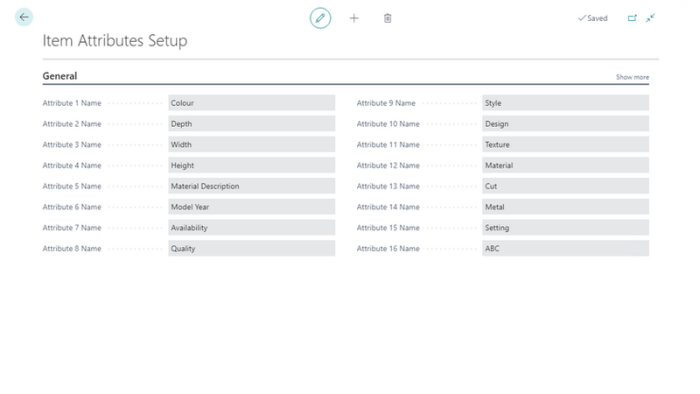
Configure dimensions, item attributes, KPIs and non-working days to align reporting with your business requirements.
Built for Growth
Support reporting across multiple companies, departments and business functions from a single platform.
Features
Connect Microsoft Dynamics 365 Business Central to Power BI
Select which companies to import
Configure dimensions and item attributes
Configure business KPIs
Setup non-working days
Optimise Power BI datasets and fact tables
Support all Business Central Insights Power BI apps
Simplified deployment and maintenance
Common Questions the Insights Connector for Power BI Answers
How do I connect Business Central data to Power BI?
Can I use a single connector for multiple reporting apps?
Which companies should be included in reporting?
How can I improve Power BI dataset performance?
How do I configure dimensions and item attributes for reporting?
How can I standardise reporting across my organisation?
How can I reduce the cost of custom reporting projects?
Connect Your Business Central Data to Power BI
The Insights Connector for Power BI is required to use any Business Central Insights Power BI app and provides the foundation for fast, reliable and scalable reporting across your organisation.
Whether you're exploring a free trial or looking to deploy reporting across multiple departments, the Insights Connector helps you unlock the full value of your Microsoft Dynamics 365 Business Central data.
Whether you want hands-on experience in a trial environment or a live demo by a solution expert, we’re here to help you explore and evaluate our Business Central Insights Power BI apps.
Start your free 30-day trial today.